ENG
 VIE
 +84 9323 494 34


What is Apple Ads? Placements, Basic vs Advanced, bidding and measurement for App Store ads
 November 11, 2026
 Tin Le
Contents
Running Apple Ads is like renting the shelf at the head of a supermarket aisle: the people walking past came into the store to shop, and you pay only when they pick up your box to look. Meta or TikTok ads are closer to handing out flyers on the street, reaching more people, most of whom are not planning to buy yet. Whether the shopper drops your box into the cart comes down to the packaging, which here means your App Store product page.
Apple Ads is Apple’s advertising platform, and since April 14, 2025 the new name for Apple Search Ads. On the App Store you pay on a cost-per-tap basis (CPT, you pay when a user taps the ad) across four placements: search results, the Search tab, the Today tab, and the “You Might Also Like” list at the bottom of product pages.
What is Apple Ads?
Apple Search Ads started with a single placement: the top of search results. The Search tab was added in 2021, and the Today tab and product pages in 2022. Once ads were no longer confined to search, Apple changed the name (Apple announcement, April 14, 2025). The same brand also covers ads on Apple News and Apple Maps (Maps is only available in the US and Canada so far); this article covers the App Store only.
For anyone working on user acquisition for iOS apps, the biggest difference from Meta or Google is the targeting signal. In search results, the ad is tied to the query the user just typed: someone who types “learn English” needs exactly that. Apple says ads at the top of search results have an average tap-to-install rate above 60% (all markets, November 2024 to October 2025). The trade-off is that ads pull their images, video and description from the product page in App Store Connect, so ASO decides half of the results.
The 4 Apple Ads placements on the App Store and the new one for 2026
| Placement | Where it appears | Targeting | Pricing |
|---|---|---|---|
| Search results | Top of the results page or further down the list | Keywords or Search Match | Max CPT per keyword, or target CPA (Maximize Conversions) |
| Search tab | Top of the suggested apps list, before the user types anything | Country, device, customer type | Max CPT, no keywords |
| Today tab | The first screen when the App Store opens | Country, device, customer type | Max CPT, no keywords |
| Product pages | Top of the “You Might Also Like” list at the bottom of another app’s page | The app category where the ad appears | Max CPT, no keywords |
The first three placements are available in 91 countries and regions; the product page placement is available in 90, as it is not yet available in mainland China (Ad placement options, accessed October 2026). According to Apple, more than 500 million people start their App Store visit from the Today tab each week, 70% of App Store visitors use search to discover apps, and almost 65% of downloads happen directly after a search (App Store, worldwide, 2022). These are Apple’s own figures and are for reference only.
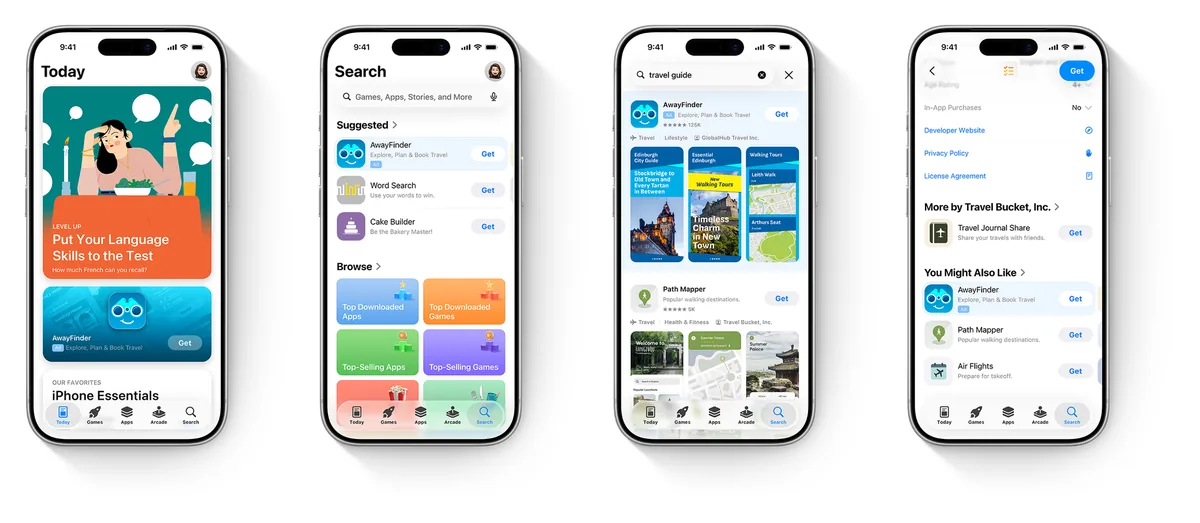
Today tab ads run only on iPhone with iOS 16.4 or later, not on iPad, and must use a custom product page as the landing page. That page has to be localized into the language of the country where the ad runs and cannot show prices or promotions (Create Today tab ads).
New: more ads further down search results
On December 17, 2025, Apple announced that from early 2026 it would show additional ads lower on the results page. The current help page confirms that ads can appear at the top or further down, and that you cannot choose or bid on each slot separately (Search results).
Coming soon: at WWDC in June 2026, Apple announced creative assets, self-designed 3:2 images and videos for Today tab and search results ads. As of October 2026, Apple’s page still says “coming soon” (Design your own ads with creative assets).
Apple Ads Basic vs Advanced: which one to choose?
Both versions remain after the rename (official comparison table, accessed October 2026):
| Criterion | Basic | Advanced |
|---|---|---|
| Placements | Search results only | All 4 placements |
| Billing | Per install; you set a max CPI | Per tap; you set a max CPT |
| Keywords, audiences | None; the system matches automatically | Keywords, Search Match, audience refinements |
| Budget | Up to $10,000 per app per month, up to 50 apps | No limit |
| Reporting, API | Quick dashboard, AdServices | Detailed reports, Insights, AdServices, Platform API |
Basic gives you no keyword data, so you cannot see where the money goes. An app with a serious UA budget, or one that needs to calculate ROAS by keyword group, should use Advanced from the start.
Bidding and billing by placement
For Advanced, Apple states that all 4 placements are billed on CPT: you pay only when there is a tap, and never more than the max CPT you set. CPM (cost per 1,000 impressions) now exists only as the “Average CPM” reporting metric. If older documentation says the Today tab is billed on CPM, check it against the official page.
A high bid alone does not win. Apple weighs relevance as well as the bid: an English learning app that bids high on “food delivery” still will not show.
Manage Bids or Maximize Conversions. Manage Bids lets you pick keywords yourself and set a max CPT for each one, with an optional CPA cap at the ad group level. Maximize Conversions (launched February 25, 2026) works only for search results: you set a target CPA, and the auto-bidder and Search Match choose keywords and bids. Apple recommends letting it run for at least two weeks before changing the target CPA (Use the Maximize Conversions bid strategy).
Daily budget is a monthly average: some days spend more, but the monthly total never exceeds the daily budget times 30.4. A hypothetical example: $50 a day means a monthly maximum of 50 × 30.4 = $1,520. Lifetime budgets have been removed, and campaigns that used them were paused from June 2026 (Manage budgets).
The formula to remember: CPA = CPT / conversion rate (CR). A hypothetical example: a CPT of $0.40, with 100 taps producing 50 installs (CR 50%), gives a CPA of $0.80. If your 30-day LTV is $1.20, you are still in profit. If CR drops to 30%, CPA becomes $1.33 and you start losing money.
Campaign structure: brand, category, competitor, discovery
Apple recommends splitting search results campaigns into 4 types (Structure campaigns). The split gives each group its own budget and CPA: brand keywords are cheap, and lumping everything together hides competitor keywords that are losing money.
| Campaign | Keywords | Match type | Purpose |
|---|---|---|---|
| Brand | App name, company name, variants | Exact | Keep the people searching for your name |
| Category | Terms describing the function or genre | Exact | Reach people with the need who do not know you yet |
| Competitor | Names of similar apps | Exact | Win people who are considering a competitor |
| Discovery | Ad group 1: keywords from the 3 groups above in broad match, Search Match off. Ad group 2: no keywords, Search Match on | Broad, Search Match | Find new keywords |
A hypothetical example, an English learning app called “EngGo” running in Vietnam:
- Brand: “enggo”, “eng go”. Bid just enough to hold the top position.
- Category: “học tiếng anh” (learn English), “luyện nói tiếng anh” (English speaking practice). The most expensive group; track CPA for each keyword.
- Competitor: the names of 3 to 5 popular English learning apps. Accept a lower CR than Brand.
- Discovery: after 1 to 2 weeks, read the search terms report. Any term that produces installs goes into Category or Competitor as exact match, and is added as a negative keyword in Discovery.
Newly added keywords default to broad match, and the match type cannot be changed once saved. To change it, pause the keyword and add it again as exact match.
Custom product pages in App Store ads
A custom product page (CPP) is a version of your product page with its own set of screenshots, video and promotional text. Since October 29, 2025, each app can create up to 70 of these pages and assign keywords to each one so it appears in organic search (Apple Developer News, October 29, 2025).
In ads, CPPs are used to create ad variations in search results (each ad group runs one custom ad at a time), are required for the Today tab, and are optional for the Search tab. A CPP can also carry a deep link (iOS 18 and later) that opens the right screen in the app directly.
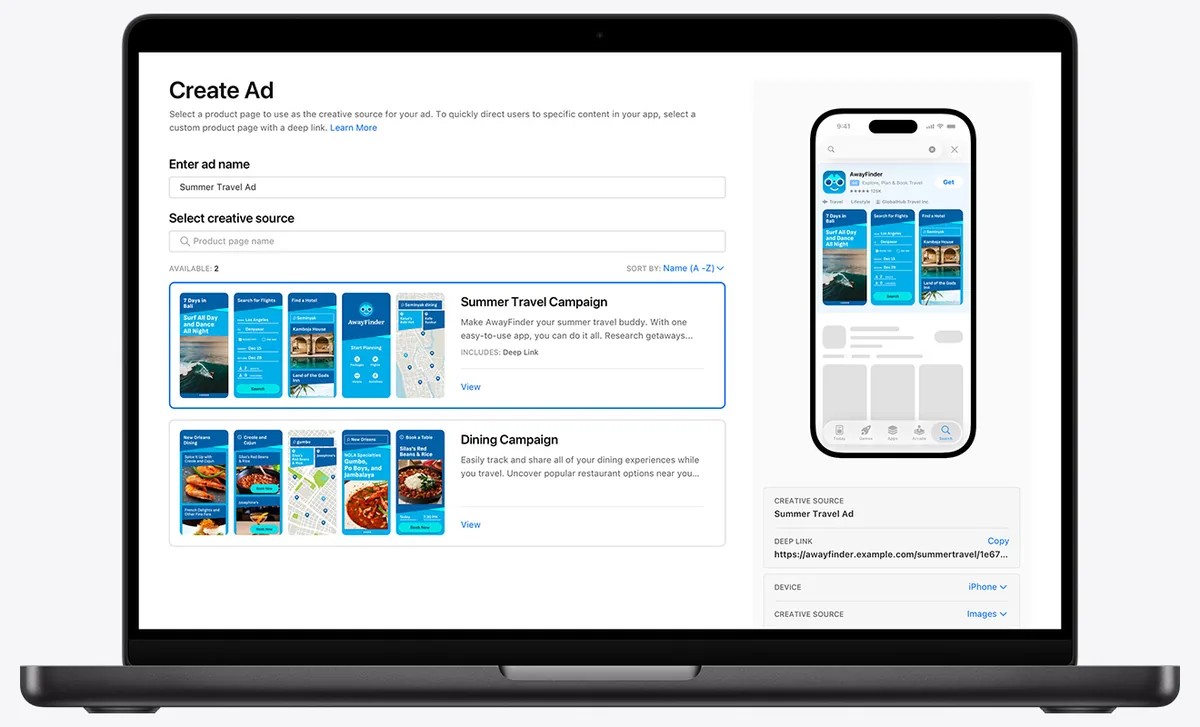
Pair CPPs with keyword groups: a “speaking practice” ad group uses a CPP whose first screenshot shows the pronunciation scoring feature, while a “vocabulary” ad group opens with flashcards. Changing only the background color will not move CR.
Apple Ads measurement: AdServices, AdAttributionKit and MMPs
App Store ads have three layers of mobile attribution data:
- Attribution API (AdServices). The app calls the AdServices framework (iOS 14.3 and later) to get a token that lives for 24 hours, sends it to Apple’s servers, and receives a record with the campaign, ad group and keyword. This is the main source for knowing which keywords drive installs (AdServices, Apple Developer).
- AdAttributionKit, Apple’s measurement framework built on top of SKAdNetwork, available since iOS 17.4 (the two frameworks are compared in our article on iOS app ad measurement). Its data is limited by crowd anonymity thresholds and delays, which makes it suitable for comparing channels but not for optimizing keywords. Two sources currently describe it differently: Apple says App Store ads registered from April 10, 2025 go through SKAdNetwork versions 1 to 3, with AdAttributionKit API integration to follow (App ad attribution overview); AppsFlyer says that from iOS 26.2 these postbacks go through AdAttributionKit (AppsFlyer Help). The safe approach is to declare a URL for receiving postback copies for both frameworks in Info.plist (Configuring an advertised app).
- MMPs such as AppsFlyer and Adjust: they collect the AdServices token, call the API for you, and then join it with in-app events such as sign-ups and purchases.
The numbers in the Apple dashboard and in your MMP almost never match, because they define things differently (Mobile measurement providers):
| Apple dashboard | MMP | |
|---|---|---|
| An install is counted when | The App Store confirms a download after a tap or view | The user opens the app for the first time |
| Attribution window | 30 days after a tap, 1 day after a view | 0 to 30 days, depending on settings |
| Redownloads | Included in total installs | Depends on the MMP |
Two things commonly cause missing numbers: ad groups that use age or gender audience refinements return attribution=false in AdServices, and people who download but never open the app are not counted by the MMP. Without the token integration, an MMP may misclassify paid installs as organic installs.
Is Apple Ads available in Vietnam?
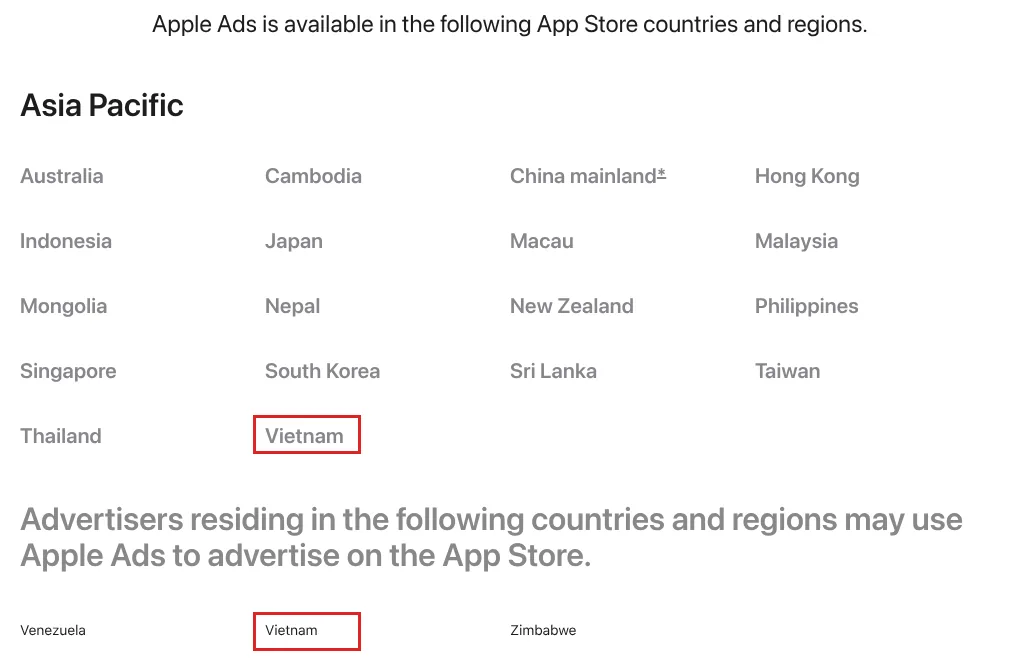
Yes. The Countries and regions page (accessed October 2026) lists Vietnam on both lists: the Vietnam App Store shows ads, and businesses based in Vietnam can open an account.
- You cannot target by province or city. Vietnam is not yet on the list of countries that support location refinement (Modify audience settings).
- Custom audiences must be larger than 5,000 people, or the ad group is put on hold.
- Age and gender audience refinements automatically exclude people who have turned off Personalized Ads, so the real audience is smaller than you think.
Apple Ads checklist for your first campaign
- Review your product page (first 3 screenshots, name, subtitle) using our article on launching an app on the App Store, because ads reuse exactly these elements.
- Create 2 to 3 custom product pages for your main need groups, localized into Vietnamese.
- Integrate AdServices (or turn on the integration in your MMP) and test it with a real install before spending money.
- Calculate the maximum acceptable CPA from LTV and profit margin.
- Build 4 search results campaigns: Brand, Category, Competitor, Discovery.
- Set a daily budget for each campaign and multiply by 30.4 to know the monthly spend ceiling.
- Add cross negative keywords between Discovery and the other 3 campaigns.
- Keep the default audience for the first 2 weeks; do not add age or gender yet.
- After 7 to 14 days: read search terms, move good terms to exact match, and pause terms whose CPA exceeds your threshold.
- Only once Category is stable, test the Today tab or product pages with a small budget.
Don’t
- Mix brand keywords and generic keywords in one ad group. The average CPA will look artificially good.
- Judge the Today tab only on installs from taps. People who see the ad today may search for the app name and download it a few days later, so look at view-through metrics too.
- Change the target CPA every day.
- Compare Apple’s numbers with your MMP’s before aligning the attribution window.
To choose reporting metrics, see our article on app marketing KPIs. App Store ads should be one channel in your app marketing strategy, running alongside channels such as Meta ads in 2026, not replacing them.
The Adtek team holds Apple Ads certification. If you need a campaign structure built, measurement set up or a live account reviewed, contact Adtek to discuss our App User Acquisition service.
Want to apply this to your business?
Send your question or situation. The Adtek team reads every question and gets back to you.
Prefer to chat? Message us on Zalo Categories
 Recent Posts