ENG
ENG VIE
VIE +84 9323 494 34


Google AI Max for Search: should you turn it on, and how to keep it in check
 October 30, 2026
  Tin Le
 Yes, turn on AI Max for Search in Google Ads, as long as the campaign uses conversion-based Smart Bidding and counts only orders or qualified forms. If it still runs on Manual CPC, or your site still carries expired promo pages, hold off. Check your account either way, because plenty of teams are already running AI Max without anyone having switched it on. New Search campaigns come with it enabled, and starting in September 2026, campaigns using automatically created assets or the campaign-level broad match setting are being upgraded to AI Max automatically (Google Ads Blog, April 2026).
AI Max for Search (labeled “Tối đa hoá AI” in the Vietnamese interface) is a feature suite you switch on inside a Search campaign. It is not a new campaign type. It lets your Google Search ads find queries beyond your keyword list, write extra headlines and descriptions, and pick landing pages on your site.
What is Google AI Max for Search?
Picture a new sales assistant. In the past you handed over a script, and they only answered the questions on it. AI Max is an assistant allowed to field unfamiliar questions, rephrase the greeting and walk customers to a different counter. Whether that means more sales or more mistakes depends on how clearly you brief them.
AI Max has three core features (Google Ads Help):
| Feature (Vietnamese interface label) | What it does | Controlled at |
|---|---|---|
| Search term matching (So khớp cụm từ tìm kiếm) | Uses broad match and keywordless technology to show ads on queries that are not in your keyword list | Ad group |
| Text customization (Tuỳ chỉnh văn bản, formerly automatically created assets) | Writes extra headlines and descriptions from your landing pages, ads and keywords using generative AI | Campaign |
| Final URL expansion (Mở rộng URL cuối cùng) | Sends people to a different page on your domain when Google predicts it fits the query better | Campaign, requires text customization |
It also brings a few new controls (locations of interest, brand lists, URL inclusions and exclusions) and more detailed reporting. Google-written headlines only serve when they are predicted to beat the ones you wrote, and they are reviewed at least every 48 hours (Google Ads Help). You cannot edit that copy. You can only remove individual assets.
How is it different from Performance Max and Dynamic Search Ads?
Performance Max runs across all of Google’s channels. AI Max only runs inside Search campaigns (Google Search Ads) and keeps your ad groups, keywords and responsive search ads as they are. When a query matches both, the ad with the higher Ad Rank serves (Google Ads Help).
Google calls AI Max the next generation of Dynamic Search Ads (DSA). Like DSA, it picks up queries based on your website content, but it also uses your ads, keywords and real-time intent signals (Google Ads Blog, April 2026).
Which Google Ads campaigns already have AI Max on?
| When | What changed |
|---|---|
| May 2025 | Google introduced AI Max for Search as a beta for advertisers worldwide (Google Ads Blog, May 2025) |
| April 2026 | AI Max moved out of beta (Google Ads Blog, April 2026) |
| From September 2026 | Campaigns using automatically created assets: upgraded with search term matching and text customization on. Campaigns using the campaign-level broad match setting: upgraded with search term matching on |
| January 2027 | New DSA campaigns can no longer be created (Google Ads Developer Blog, June 2026) |
| February 2027 | Remaining active DSA campaigns are upgraded automatically (Google Ads Developer Blog, June 2026). Under the plan Google announced in April 2026, upgraded DSA campaigns get all three features with their existing URL rules kept |
Your first job is to find out which campaigns already have it. In the campaign list, AI Max can be added as a column or used as a filter. If you run Google Ads across many campaigns, start there.
Should you turn on AI Max for Search?
Yes and no.
Google says advertisers who activate AI Max typically see 14% more conversions or conversion value at a similar CPA or ROAS. For campaigns where more than 70% of conversions come from exact and phrase match keywords, the typical uplift is 27% (Google Ads Blog, May 2025). Using all three features adds an average of 7% more conversions compared with search term matching alone (Google Ads Blog, April 2026).
All three figures are Google’s internal data, measured on non-retail advertisers. Google sells the clicks, so I treat these numbers as a hypothesis to test, not a result you are guaranteed.
CPA (cost per acquisition) = cost / conversions. Spend VND 20 million and get 100 leads, and your CPA is VND 200,000. ROAS = revenue / ad spend.
Turn it on when
- The campaign uses conversion-based Smart Bidding: Maximize conversions, Maximize conversion value, target CPA (tCPA) or target ROAS (tROAS). Google says the three features need this kind of bidding to work effectively.
- Your conversion action measures what you actually want: orders or qualified leads. If you also count clicks on the call button, the AI will go looking for more cheap, useless actions.
- The campaign is not limited by budget. Google says AI Max is not effective when the campaign is budget limited.
- You mostly run exact and phrase match and suspect you are missing long-tail queries.
Hold off when
- The campaign uses manual CPC. Search term matching does not work with manual bidding.
- You are in a category with strict ad copy rules (pharmaceuticals, finance) and must pin mandatory headlines. With final URL expansion or URL inclusions on, pinned assets may not be used.
- Your site still has expired promotion pages or discontinued products. The AI writes ad copy from your landing pages.
- Your tracking template uses a static URL or a nonstandard {lpurl} tag. Dynamic landing pages can return 404 errors.
Do AI Max ads show inside AI Overviews in Vietnam?
Google says Search campaigns using broad match, including AI Max, are eligible to show ads in AI Overviews and in AI Mode, which it is testing (Google Ads Blog, May 2025). The Help Center says ads within AI Overviews are currently available only in English in 12 countries, including Singapore, Malaysia, Indonesia, the Philippines and the US (Google Ads Help, checked October 2026). Vietnam is not on the list.
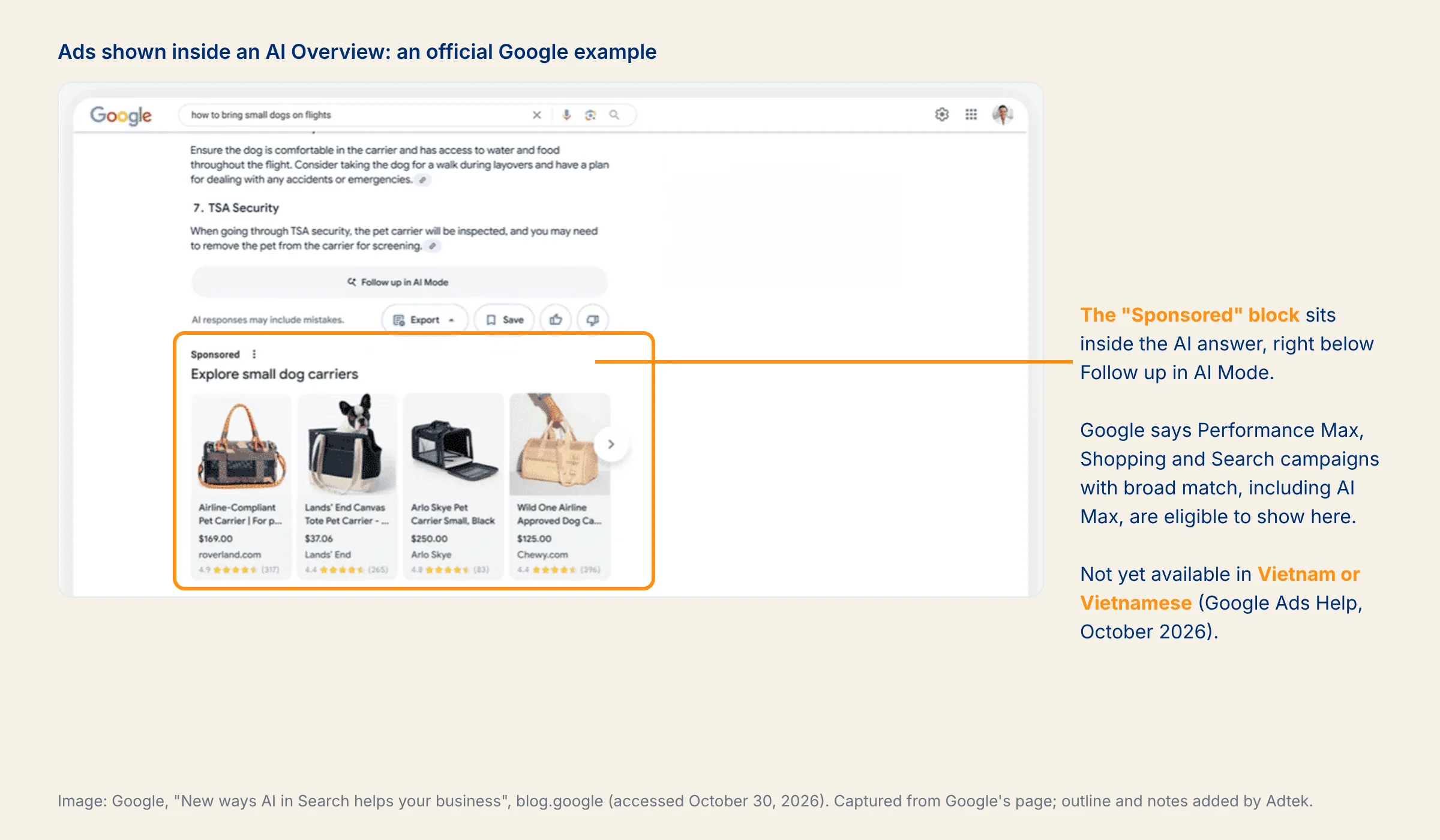
So “getting into AI Overviews” is not yet a reason to turn on AI Max for Vietnamese-language campaigns. If you want AI to mention your brand, see our piece on AIO. Ads inside chatbot answers are covered in our article on ChatGPT Ads.
How to control AI Max in Google ads
Most people who run Google Ads worry about AI Max because they think they lose control over keywords. You still have 8 controls. They just live in different places (Google Ads Help).
1. Negative keywords. AI Max respects negative keywords. They are still the fastest way to block queries with the wrong intent.
2. Brand lists. Create them under Tools, Shared library, Brand lists. Use brand inclusions (campaign or ad group level) so a campaign only serves on queries containing the brands on the list. Use brand exclusions (campaign level only) to keep a non-brand campaign off your own brand terms or a competitor’s.
3. URL exclusions. Campaign level. Stop people being sent to your careers page, blog or cart. Requires text customization and final URL expansion to be on.
4. URL inclusions. Ad group level. With URL inclusions on and final URL expansion off, Google only uses the URLs you choose as dynamic landing pages.
5. Turning off search term matching per ad group. Switch it off for brand ad groups or sensitive ad groups and leave it on elsewhere.
6. Locations of interest. Ad group level and exclusive to AI Max. It helps an ad group reach people whose intent points to a specific place, even on keywordless matches.
7. Text guidelines (beta). Campaign level, requires text customization. Each campaign can have up to 25 term exclusions and 40 messaging restrictions. Term exclusions only apply to the language you type them in, while messaging restrictions apply across all languages in your ads (Google Ads Help).
8. Switching off parts of it. Turning off text customization also turns off final URL expansion. Turning off AI Max entirely disables every feature that comes with it, brand exclusions included. Turn it back on and your previous settings return.
One more technical point: your tracking template should use {lpurl}, {lpurl}?, {lpurl}& or {lpurl}# so dynamic landing pages do not break.
Keyword match types after you turn on AI Max
Keyword match types still exist (the Vietnamese interface calls them “kiểu khớp”). When a query is identical to an exact match keyword, that keyword takes priority. Next come phrase and broad keywords identical to the query, then AI-based relevance, then Ad Rank. Campaigns that used the broad match setting lose their “treated as exact match” priority when they move to AI Max, so add exact match copies if you want to keep it (Google Ads Help).
A template for text guidelines
Google recommends one requirement per guideline, with an example. The template I use:
[Don’t / Always] + [one specific action] + “, for example: ” + [example]
Filled in: “Don’t mention prices or discount percentages, for example: VND 3,990,000, 20% off.” Prices have to be blocked with a messaging restriction like this. Adding a currency symbol to term exclusions does not stop assets that contain prices.
Avoid:
- Vague feelings: “Ads should feel trustworthy.”
- Bundled requirements: “Don’t say cheap, don’t mention competitors, spell the brand name correctly.” Split it into three lines.
- Wishes: “If possible, talk about the warranty.” The system only accepts hard requirements.
- Results: “Ads must deliver a ROAS of 10.”
Example: turning on AI Max for a search campaign, step by step
Example (hypothetical): I run Google ads for a company selling water purifiers in Ho Chi Minh City. Its non-brand Search campaign uses a target CPA of VND 250,000 per consultation form. Over 30 days it spent VND 60 million and generated 240 forms, and it is not limited by budget. The Google Ads Help Center already covers the click-by-click setup, so here I only walk through the decisions.
Step 1: Check the prerequisites. Bidding is target CPA: pass. The conversion only counts successfully submitted forms: pass. The tracking template uses {lpurl}?: pass.
Step 2: List the worries. I read 90 days of the search terms report and come up with 4 worries:
- Ads showing for “water purifier repair”, “cheap filter cartridges” and “installer jobs”. The company does not repair machines or sell cartridges on their own.
- The AI writing “50% off” or “Cheapest in HCMC” when no such offer exists.
- Final URL expansion sending people to the careers page, the blog or discontinued models.
- The non-brand campaign serving on queries with the company name and taking traffic from the cheaper brand campaign.
Step 3: One control per worry.
- (1): negative keywords for “repair”, “replacement cartridge”, “jobs”, “hiring”.
- (2): text guidelines “Don’t mention prices or discount percentages, for example: 50% off.” and “Don’t use superlatives, for example: cheapest.” Plus term exclusions for “cheapest” and “free”.
- (3): URL exclusions for URLs containing /tuyen-dung/ (careers), /blog/ and discontinued product pages.
- (4): a brand exclusion using a list with the company’s name.
That handles all 4 worries without switching off a single feature.
Step 4: Run an experiment instead of switching it on outright. Under Experiments, I create an AI Max experiment. Google splits traffic within the same campaign: one share with AI Max off (control), the rest with it on (Google Ads Help). A 1-click experiment recommendation sets up a 50/50 split automatically. You cannot create this type of experiment if the campaign already has text customization on, uses a portfolio bid strategy or a shared budget, or already has an active experiment.
Step 5: Wait before reading the results. Google recommends waiting at least 2 weeks after enabling AI Max before making changes, including adding negative keywords (Google Ads Help). I run it for 4 weeks. Hypothetical results:
| Control (AI Max off) | Trial (AI Max on) | |
|---|---|---|
| Cost | VND 30 million | VND 30 million |
| Consultation forms | 120 | 132 |
| CPA | VND 250,000 | VND 227,000 |
| Qualified forms (confirmed by sales) | 90 (75%) | 92 (70%) |
| Cost per qualified form | VND 333,000 | VND 326,000 |
Going by the CPA in Google Ads, AI Max is 9% cheaper. Going by qualified forms, it adds just 2 forms and is 2% cheaper. Filtering for the “AI Max” match type, I see most unqualified forms came from cartridge queries. I add negatives, run 2 more weeks, and only then click Apply. The decision rests on qualified forms, not on the CPA the platform reports.
How to compare platform numbers with real revenue is covered in our article on growth marketing metrics. To find out whether ads create new orders or just take credit for ones you would have had anyway, see our piece on incrementality testing.
Where to read AI Max reports
| Report | What to look at |
|---|---|
| Search terms | Filter Match type = “AI Max” and add the Source column to see whether a query came from broad match expansion or keywordless matching. The search terms and ad combinations view shows the headline and landing page that went with each query |
| Keywords | Two total rows at the bottom: traffic from broad match expansion and traffic matched through landing pages or assets |
| Landing pages | The “Selected by” column shows which pages AI Max chose |
| Assets | The “Added by” column shows “Google AI” for headlines and descriptions Google wrote |
The “AI Max” match type filter leaves out the “Other search terms” row, so the totals can look lower than they really are.
AI Max for Search checklist
| When | Task | Done when |
|---|---|---|
| Before | Filter the AI Max column in the campaign list | You know which campaigns have it on, including auto-upgraded ones |
| Before | Bidding, budget, conversions | Conversion-based Smart Bidding, no budget limit, only orders or qualified leads counted |
| Before | Website and tracking template | No expired pages or wrong prices; {lpurl} used in a supported form |
| At launch | Negatives, brand lists, URL exclusions, text guidelines | Every worry on your list has a control blocking it |
| At launch | Exact match keywords for your core queries | Core queries still land in the right ad group and page |
| At launch | AI Max experiment | There is a control arm, running 2 to 4 weeks |
| Weekly | Search terms, asset and landing page reports | Bad headlines removed, negatives added, odd URLs excluded |
| End of test | Cost per order or qualified lead | Apply only if it beats the control |
Avoid
- Turning on AI Max in a manual CPC campaign and then concluding “AI Max doesn’t work”.
- Pinning a “License No. …” headline for legal reasons while leaving final URL expansion on.
- Adding dozens of negative keywords in week one for queries that are only slightly off, not clearly wrong.
- Calling a VND 227,000 CPA a win when qualified forms barely moved.
Meta has moved the same way: targeting goes to the machine, and advertisers keep control of conversion data, creative and account structure (see our article on Meta Andromeda). When you run Google ads, the part you keep is your negative list, your brand lists, a clean website and a conversion number you can trust.
If you need someone to review Search campaigns that have been auto-upgraded to AI Max and set up an experiment with a proper control arm, contact Adtek.
Sources
- Google Ads & Commerce Blog (May 2025). Introducing AI Max for Search campaigns.
- Google Ads & Commerce Blog (April 2026, updated June 2026). We’re upgrading Dynamic Search Ads to AI Max.
- Google Ads Developer Blog (June 2026). Dynamic Search Ads (DSA) Automigration Delayed to February 2027 and Campaign Creation Restored.
- Google Ads & Commerce Blog (May 2025). More opportunities for your business on Google Search.
- Google Ads Help (checked October 2026). About AI Max for Search campaigns; How AI Max for Search campaigns works; Set up AI Max for Search campaigns; Frequently asked questions about AI Max for Search campaigns.
- Google Ads Help (checked October 2026). About AI Max experiments; About reporting in AI Max for Search campaigns.
- Google Ads Help (checked October 2026). About text customization in Search campaigns; Use text guidelines with Performance Max and Search campaigns (beta).
- Google Ads Help (checked October 2026). About the broad match keywords campaign setting; About ads and AI Overviews.


Want to apply this to your business?
Send your question or situation. The Adtek team reads every question and gets back to you.
Prefer to chat? Message us on Zalo Categories
  Recent Posts