ENG
 VIE
 +84 9323 494 34


Zalo OA and ZNS: using Zalo as a CRM channel in Vietnam
 November 24, 2026
 Tin Le
Contents
I have not seen any public data that compares channels well enough to call Zalo OA and ZNS the most effective CRM channel in Vietnam. What can be measured is reach: Zalo, Vietnam’s main messaging app, had 82.6 million monthly active users (VNG, Q3 2026), and ZNS can deliver a message to the phone number of a customer who has bought from you, even if that person never followed your Official Account. Whether the channel works for you depends on how you connect it to your CRM and whether you send the right message type to the right person.
By the end you will have a table for choosing the message type at each customer stage, a way to estimate costs with the new ZNS price list, and a task list to hand to your developers.
Zalo OA, ZNS and CRM: three different things
Picture a shop. CRM (Customer Relationship Management) is the ledger with each customer’s name, past orders and last visit. Zalo OA (Zalo Official Account) is the branded front desk inside Zalo: customers walk up and ask, staff reply. ZNS is the mail carrier: it delivers a pre-approved letter to the exact phone number in the ledger, even if the customer has never stopped by the desk.
If your customer list still lives in Excel, an OA is just one more inbox. Zalo marketing only runs smoothly when the CRM decides who gets which message and when.
A note on names: ZNS (Zalo Notification Service) is the name most marketers still use. Current Zalo Business Solutions documentation calls it ZBS Template Message, and the old zalo.cloud site now redirects to zalo.solutions. A short definition sits on our Zalo ZNS glossary page.
Zalo OA: verification and choosing a plan
To send messages, run broadcasts or use a chatbot you need a verified OA. An advertising profile, meant for sellers without a business registration certificate, can only run ads (Zalo OA, creating an OA). You create a Zalo OA at oa.zalo.me by logging in with a personal Zalo account tied to a Vietnamese (+84) number. Verification requires a business registration certificate or an official letter in Zalo’s template, submitted within 14 days, and review takes about 2 to 3 working days. The step-by-step setup is on our Zalo OA glossary page.
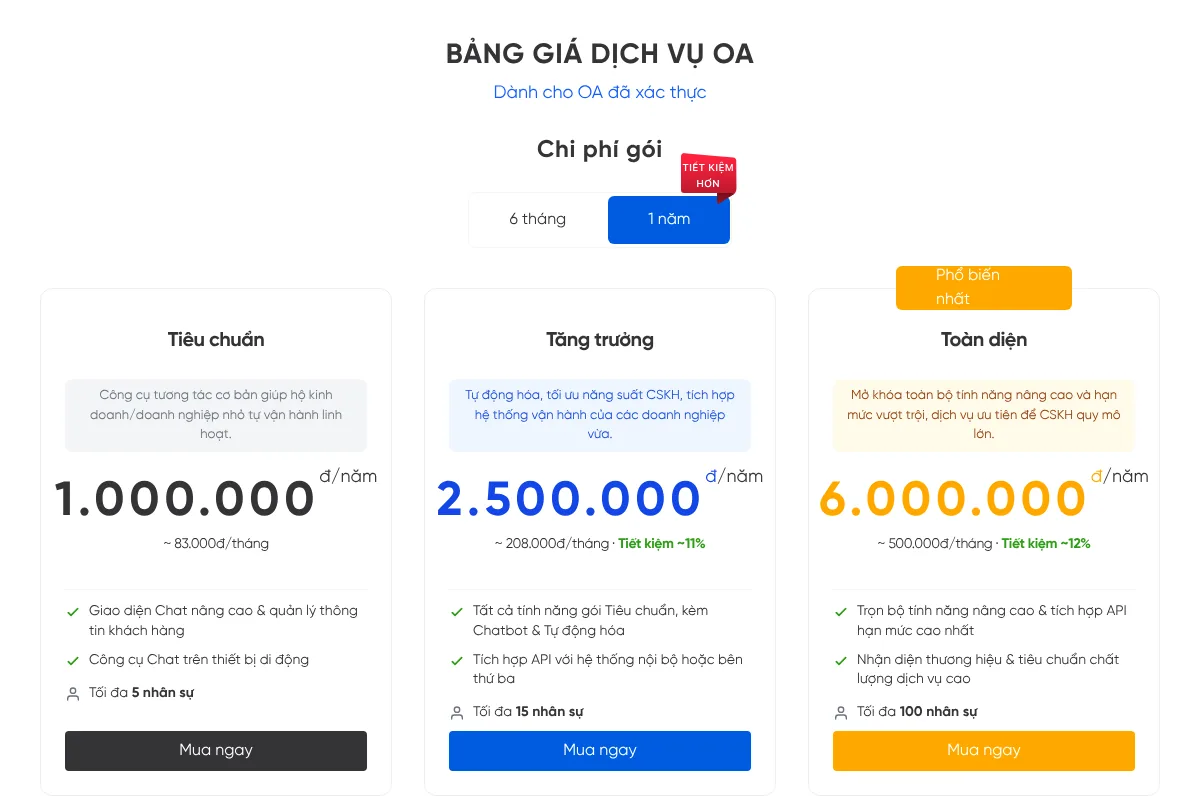
The Zalo OA price list in force since June 1, 2026, with 10% VAT included (OA price list):
| Plan | Price | Staff seats | What matters for CRM |
|---|---|---|---|
| Cơ bản (Basic) | Default | 3 | Basic chat, no customer profile page |
| Tiêu chuẩn (Standard) | VND 1,000,000/year | 5 | Advanced chat, customer profile page |
| Tăng trưởng (Growth) | VND 2,500,000/year | 15 | Chatbot, Open API at 100 calls/minute, 500 consultation messages outside the 48-hour window per month |
| Toàn diện (Comprehensive) | VND 6,000,000/year | 100 | Chatbot, Open API at 2,000 calls/minute, 2,000 consultation messages outside the 48-hour window per month |
Which Zalo OA plan do you need to connect a CRM? Linking CRM software to the OA through the API, or sending ZNS through the API, requires the Growth or Comprehensive plan. The Standard plan can only send ZNS with restrictions through a tool Zalo lists as coming soon. Plan fees are non-refundable.
The 4 Zalo OA message types and when you can send them
Customer care messaging on Zalo OA comes in 4 types, each with its own conditions (Zalo OA, effective January 1, 2026). A consultation message is like talking at the counter: the customer speaks first. A broadcast is like a flyer sent to people who signed up for it. ZNS is like a letter sent to a home address.
| Message type | Who receives it | Timing | Cost |
|---|---|---|---|
| Consultation message | People who interacted with the OA (messaged, called, commented, tapped a menu) and have not blocked it | OA Manager: within 365 days; OpenAPI: within 7 days of the last interaction | Free within 48 hours, then counted against the plan quota, then VND 55 per message |
| GMF group message | Members of the OA’s group chats | 24/7 | Messages free until December 31, 2026; groups carry a monthly fee |
| Broadcast | People currently following the OA | 6:00 to 19:59 | Plan quota: 4 broadcasts per follower per month on Growth and Comprehensive |
| ZNS | Customers who have transacted with you, by phone number or UID | By Tag (next section) | Charged per message |
A UID (User ID) identifies one Zalo user in relation to one OA. Promotional messages are capped at 1 per day and 30 per month per follower (OA interaction policy). A Zalo OA broadcast can be filtered by label, age and gender (Sending broadcasts).
Zalo ZNS marketing: Tags, templates and sending hours
The first rule: ZNS can only go to people who have already transacted with your business. The single exception is a verification code for a customer creating a new account (template review rules, October 2026 version). ZNS is not a prospecting tool, and purchased phone lists cannot be used.
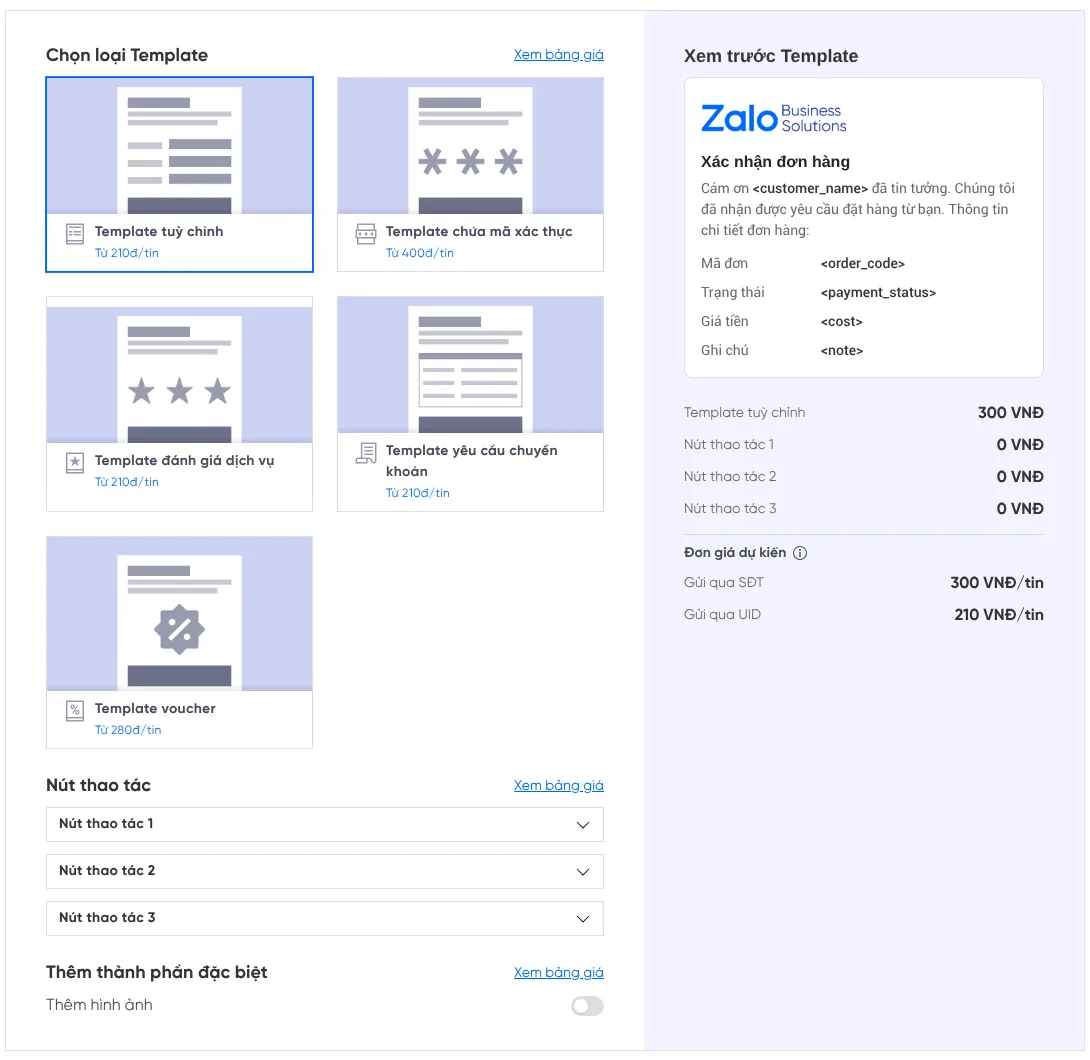
A ZNS message shows under the OA’s name with a logo, an information table, parameters such as the customer’s name or order ID, and buttons. There are 6 template types: custom, verification code (OTP), service rating, transfer request, voucher and quick reply (Zalo Business Solutions). In the image below, look at the buttons at the bottom of each message.
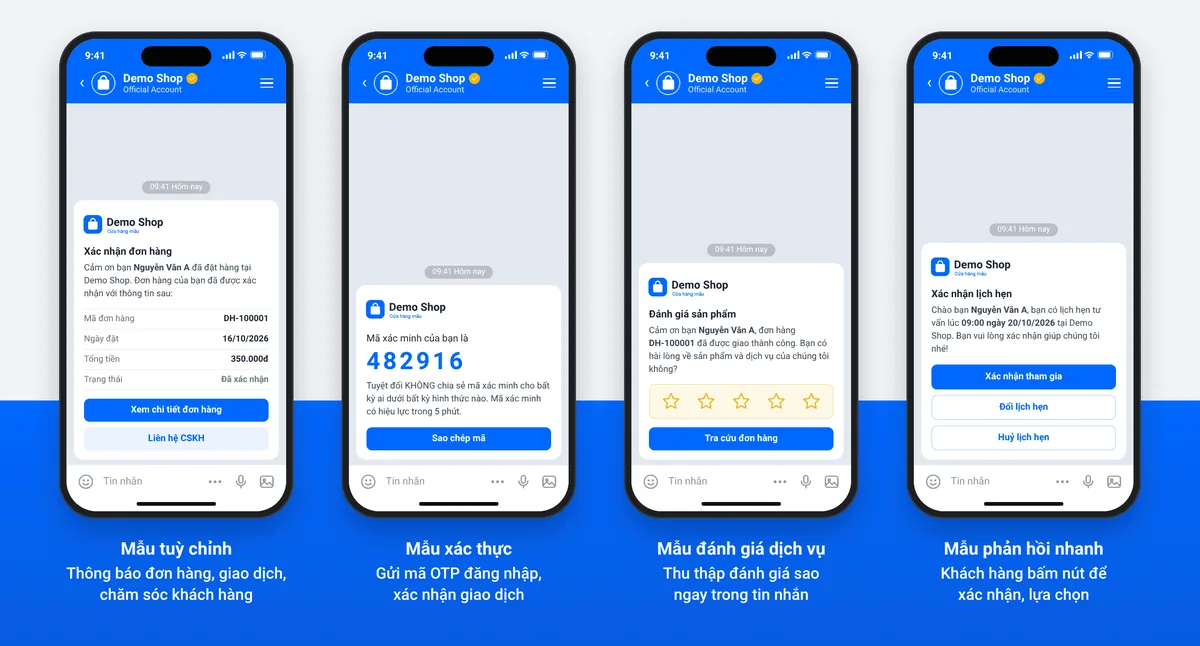
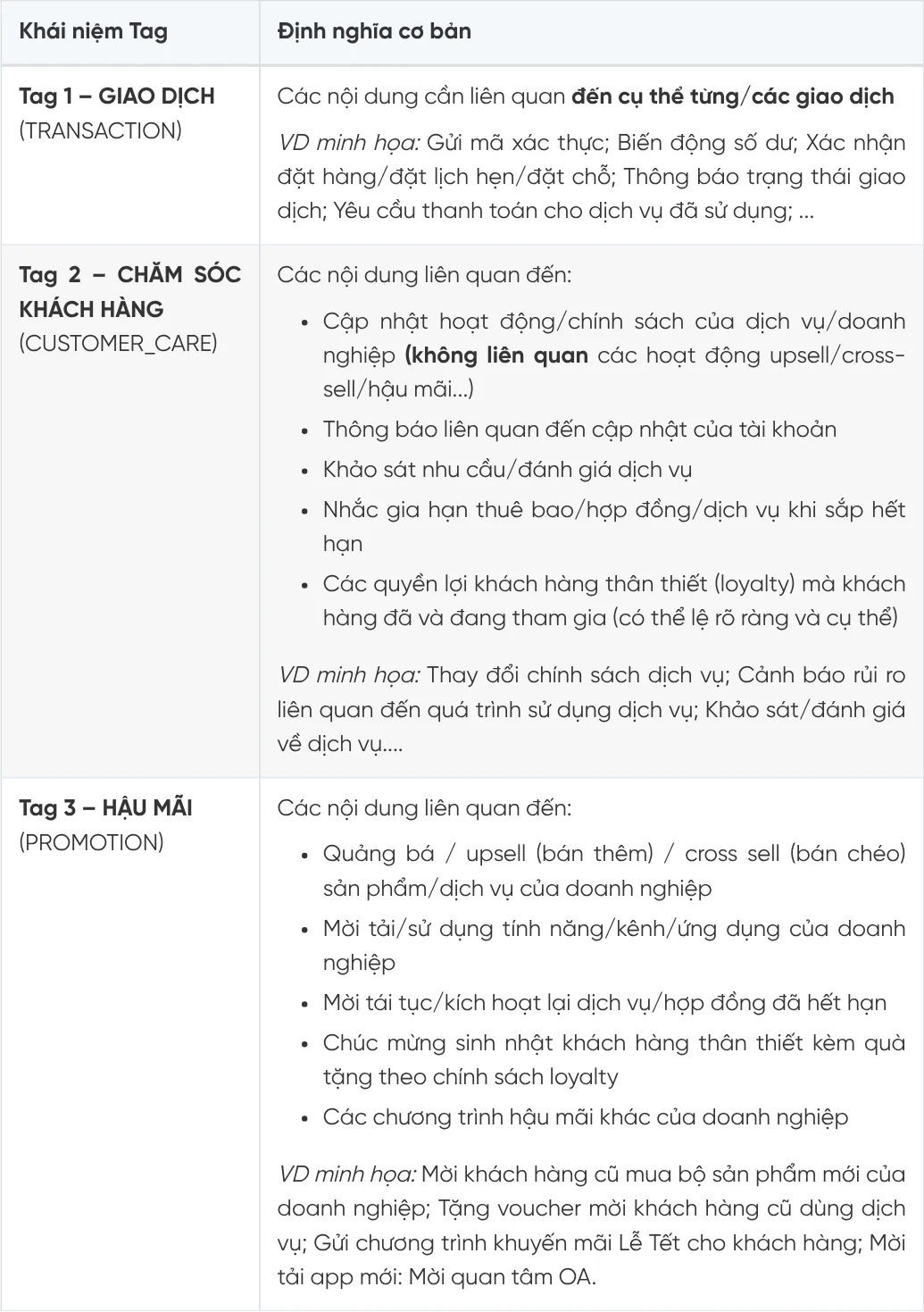
Every template must carry a purpose, called a Tag. Sending hours by Tag apply from October 15, 2026 (Zalo marks this date as expected); Tag 2 and Tag 3 messages sent outside the window return an error code and you have to resend them yourself (Zalo announcement).
| Tag | Used for | Sending hours | Example CRM event |
|---|---|---|---|
| 1: Transaction | OTP, order confirmation, appointments, delivery status, payment requests | Any time | New order created |
| 2: Customer Care | Policy updates, surveys, renewal reminders before expiry, loyalty benefits | 7:00 to 22:00 | Delivered 3 days ago |
| 3: Promotion | Upsell, cross sell, vouchers, holiday promotions, invitations to follow the OA, birthday gifts | 7:00 to 22:00 | No repeat purchase in 30 days |
Any template with a promotional element is classified as Tag 3. Birthday greetings for loyal customers moved from Tag 2 to Tag 3 on September 25, 2026.
Template review rules to remember
Templates are reviewed in about 2 to 3 working days. A formula for a template that passes: [customer name or a personalization parameter] + [at least 1 identifying parameter such as the order ID <order_code>, required for Tag 1 and Tag 2] + [content that matches the Tag’s purpose] + [links and phone numbers placed on buttons]. Discount codes must use the Voucher template. Spas, cosmetics, veterinary services, medical services, dietary supplements and over-the-counter drugs need extra licenses when registering templates (part 4 of the rules). I have grouped the common mistakes in the “Mistakes to avoid” section below.
Sending quota and report rate
Zalo grades each OA’s sending quality by the share of recipients who report its messages (quality assessment rules):
- A new OA starts with a daily quota of 20,000 messages; the 5,000 and 1,000 levels are penalty tiers.
- Zalo recommends a daily report rate below 0.1%. Templates that exceed the allowed level are disabled.
- If reports in a single day exceed 2% of the daily quota, the OA drops one quota level immediately.
- Each customer receives at most 1 Tag 3 message per day from a given OA.
The math: at the 20,000 level, just over 400 reports (2%) in one day push the OA down to 5,000.
Latest ZNS price list
Prices exclude VAT and apply only to successfully processed messages (ZBS Template Message price list; ZBS Template Message general policy, updated July 9, 2026):
| Item | Price when sent by phone number |
|---|---|
| Verification code (OTP) template, voucher template | VND 400 per message |
| Transfer request template and all other templates | VND 300 per message |
| Copy, transfer and view details buttons | VND 0 |
| Buttons to the OA page, Zalo Mini App or the business’s website | First button in each category VND 0, each additional button VND 100 |
| Call button; button to another website; app download landing page | VND 200; VND 500; VND 3,000 |
| Image in the template | VND 300 |
Sending by UID is cheaper: the estimator on the price page shows a custom template at VND 300 by phone number and VND 210 by UID. The discount varies with template type and buttons.
For a message sent by phone number, Zalo only counts it as successfully processed, and so charges for it, when the sending time stays within the timeout: 15 seconds for verification messages, 7,200 seconds for everything else. Sending time runs from when the message is sent successfully to Zalo’s server (sent_time) to when it is delivered to the user’s device (delivery_time) (pricing mechanism). An OTP that arrives after 20 seconds costs nothing.
Connecting Zalo OA and ZNS to your CRM
Zalo CRM is not a separate piece of software. The CRM holds the data and triggers the sends, while the OA and ZNS act as the channel. The customer profile page inside the OA is enough for a few agents chatting by hand; for messages that fire automatically on events you need a CRM system or a marketing automation tool connected through the API.
CRM data you need before sending
- Phone numbers in international format: 0912345678 becomes 84912345678.
- The ID and date of the most recent transaction.
- Consent status for each purpose, with the time and source of consent.
- The customer’s UID, if they have interacted with the OA.
Campaign upload or API
You need three accounts: a ZBS account (create templates, top up, view reports), a verified OA, and an application (AppID) that the OA has authorized to send messages.
- Campaign upload: upload a CSV, XLS or XLSX file of up to 100,000 rows to the ZBS account. Once confirmed, a campaign cannot be stopped, and sending can take up to 24 hours (campaign sending).
- API: the CRM calls the Zalo API whenever an event happens, such as a new order or a completed delivery. This needs the Growth or Comprehensive plan and someone to build the Zalo OA API integration.
My advice is to start with a few Tag 3 campaigns sent by file upload to measure the report rate, and only then move Tag 1 and Tag 2 messages to the API. Transaction messages need to arrive instantly, and an Excel file cannot do that.
A step-by-step example
Example (hypothetical): a shoe brand that sells online and through 2 stores, with 6,000 orders a month, a Growth plan OA and CRM software.
Step 1. List the events. (1) New order created. (2) Delivered 3 days ago. (3) Customer messages the OA about changing size. (4) No repeat purchase in 30 days. (5) Member’s birthday.
Step 2. Assign message types. (1) ZNS Tag 1, custom template. (2) ZNS Tag 2, service rating template. (3) Consultation message, free within 48 hours. (4) ZNS Tag 3, voucher template, only for customers who agreed to receive offers. (5) ZNS Tag 3, which must include an image and a gift.
Step 3. Write the template for (1). “Thank you <customer_name> for your order. Order <order_code> worth <order_amount> is being prepared and should arrive on <delivery_date>.” It has the customer’s name and an order ID, and no link in the body.
Step 4. Estimate the monthly cost.
| Event | Messages | Unit price (VND) | Total (VND) |
|---|---|---|---|
| (1) Order confirmation | 6,000 | 300 | 1,800,000 |
| (2) Post-delivery rating | 5,700 | 300 | 1,710,000 |
| (4) Repeat-purchase voucher | 1,500 | 400 | 600,000 |
| (5) Birthday with image | 300 | 400 + 300 | 210,000 |
| Total ZNS, excluding VAT | 4,320,000 |
Add the Growth plan: VND 2,500,000 / 12 = about VND 208,000 a month. If 2,000 order confirmations go out by UID, you save 2,000 x (300 – 210) = VND 180,000.
Step 5. Set sending rules. Tag 2 and Tag 3 only go out between 7:00 and 22:00. Never send (4) and (5) on the same day. A repeat purchase stops (4); a consent withdrawal removes the customer from (4) and (5).
Step 6. Measure. Hold back 10% of customers eligible for (4) as a control group, and after 30 days compare the repeat-purchase rate of the two groups, the same idea as incrementality testing for ads.
So (1), (2) and (3) are operational messages customers expect. Only (4) and (5) are marketing, and that is the part that needs separate consent.
Tasks for your developers
| Task | Note |
|---|---|
| Create an AppID on Zalo for Developers, link it to the ZBS account, have the OA authorize the app | The person doing this must be both an OA admin and an app administrator |
| Call the API to send ZNS by phone number and by UID from the CRM | Prefer UID when available |
| Receive delivery status by webhook, store delivery_time and error codes | Used to reconcile charges against the timeout |
| Save the UID to the customer profile whenever the customer interacts with the OA | Consultation messages through OpenAPI only work within 7 days |
| Queue that blocks Tag 2 and Tag 3 outside 7:00 to 22:00, max 1 Tag 3 message per customer per day | Avoids error codes and reports |
| Sync consent status and the suppression list across CRM, call center and ZNS; alert when the daily quota drops |
Consent and personal data when sending ZNS
The “has transacted” condition is Zalo’s rule, not legal consent. Vietnam’s Personal Data Protection Law No. 91/2025/QH15, in force since January 1, 2026, requires consent for each purpose, in a verifiable form, and silence or no response does not count as consent (Article 9). Using customer data for advertising requires the customer’s consent with clear knowledge of the content, method and frequency, plus a way for the customer to refuse (Article 28).
Tag 3 messages are advertising: a customer leaving a phone number at checkout has not agreed to receive vouchers on Zalo. A separate, unticked consent box could read: “I agree to receive offers from [brand] by Zalo message, no more than [4] messages a month, and I can opt out at any time by [messaging STOP to the OA or calling the hotline].”
A list collected this way is your first-party data. Penalties and how to handle consent withdrawals are covered in our post on Vietnam’s personal data protection law.
A framework for choosing messages across the customer lifecycle
Each row is one automated flow in the CRM.
| Stage | CRM event | Message type | Metric to watch |
|---|---|---|---|
| New lead | Customer messages the OA from an ad or QR code | Consultation message within 48 hours, chatbot after hours | Response time, lead-to-order rate |
| First purchase | New order, payment, delivery | ZNS Tag 1 | Delivery success rate |
| After purchase | Delivered a few days ago | ZNS Tag 2, rating template | Rating rate, average score |
| About to expire | Service plan or warranty has few days left | ZNS Tag 2, renewal reminder with days remaining | Renewal rate |
| Lapsed | Past the repurchase cycle, opted in to offers | ZNS Tag 3, voucher template | Repurchase rate versus control group, report rate |
The metric that matters in the end is the retention rate and LTV of the group that receives messages, not the number of messages sent (how to calculate them is in our post on growth marketing metrics). In long-cycle industries the “new lead” flow carries the most weight; how to move leads from Zalo Form into the CRM is covered in our post on real estate lead generation.
Checklist before switching on the first flow: OA on the right plan, ZBS account linked and topped up, templates approved under the right Tag, CRM holding 84-format numbers and consent status, sending-hour rules and a control group in place, and someone checking the report rate every morning.
Mistakes to avoid with Zalo OA and ZNS
- Using “anh/chị” (the gendered “Mr./Ms.” form). Wrong: “Chào anh/chị <name>”. Right: “Chào quý khách <customer_name>” (“Dear valued customer”).
- Links in the message body. Wrong: “See your order at bit.ly/donhang”.
- Absolute claims in Tag 3. Wrong: “The best shoe collection of Tet”.
- Sending to purchased numbers or leads who have not transacted. It breaks Zalo’s rules and needs consent under the law.
- Invitations to group chats. Wrong: a “Join our flash sale group” button.
- Blasting vouchers to every customer who has not bought in a year. Reports above 2% of the daily quota drop the OA a level the same day.
ZNS only reaches customers who use Zalo, so a CRM strategy still needs email or SMS Brandname (registered sender-name SMS) for everyone else.
If you need to build the lead flow from ads into your CRM and then nurture it through Zalo OA, see how Adtek handles lead generation or contact Adtek.
References
- VNG (October 31, 2026). VNG Snapshot Q3 2026 (Zalo 82.6 million MAU, last 30 days of the period).
- Zalo Official Account (accessed November 2026). Creating an OA, Message types, Broadcasts, Interaction policy.
- Zalo Business Solutions. OA price list (effective June 1, 2026), ZBS Template Message price list (accessed November 2026).
- Zalo Business Solutions (accessed November 2026). Introduction to ZBS Template Message, Template review rules (October 2026 version), Sending quality, Pricing mechanism, Campaign sending.
- Zalo Business Solutions (October 2026). Announcement on ZBS Template Message updates.
- National Assembly of Vietnam (June 2025). Personal Data Protection Law No. 91/2025/QH15, Article 9 and Article 28.
Want to apply this to your business?
Send your question or situation. The Adtek team reads every question and gets back to you.
Prefer to chat? Message us on Zalo Categories
 Recent Posts