ENG
 VIE
 +84 9323 494 34


How to produce 30 AI ad creatives a month and keep your brand identity
 November 19, 2026
 Tin Le
Contents
At the start of the month, your boss asks for 30 new ads for Facebook and TikTok, and the team is one designer and one copywriter. With no creative strategy written down, you open an AI tool and generate 30 AI ad creative images in one afternoon. At review time, the 30 images look like they came from 30 different brands: off colors, unfamiliar models, copy that reads like machine translation. The tool did nothing wrong. The AI simply had no brief specific enough to follow.
By the end, you will have brand guidelines written for AI, a 30-ad matrix, a review checklist, an AI labeling process and a way to tell when an ad needs replacing.
Creative strategy first, AI second
Meta and TikTok now target broadly, so the ad itself decides who stops to watch. Meta recommends creatives that differ clearly in theme, imagery and message (see the pillar post on Meta Andromeda). Two ads that differ only in background color are easy for the system to treat as one.
The number 30 is a multiplication: 5 concepts x 3 hooks x 2 formats. AI fills each cell quickly. Choosing the concepts and the audience is still the job of someone who understands the customer.
Think of a pho shop with three cooks: without a shared recipe, each one seasons the broth differently. AI is a very fast cook. Without a recipe, you get 30 bowls with 30 flavors.
Brand guidelines for AI: 3 things the AI needs
The brand identity kit you already have is usually a PDF of several dozen pages written for designers. AI needs three leaner things: a reference image set, a brand voice and prompt templates.
Reference image set
These are real product photos from every angle: front, 45 degrees, in hand, close-up of the material. The rule to set: AI may change the scene, lighting and props, but it may not redraw the product. AI tends to warp labels, change the net weight and add details that do not exist. If the delivered product looks different from the ad, the ad is misleading.
Add 5 to 10 past ads that performed well so the AI learns your layout and color palette. TikTok Symphony now accepts up to 50 references (images, video, audio) per video, up from 9 before (TikTok for Business, November 8, 2026).
Brand voice
Write a one-page brand voice: how you address customers, 10 words you always use, 10 words you never use, 5 approved sample lines. Example for a coffee brand: casual “we” and “you”; use “unblended roast” and “phin filter”; never use “miracle”, “number one” or “100% guaranteed”.
Meta Ads Manager has a Branding section where you save a text tone and a list of words blocked from AI-generated text (Meta Business Help Center). But Meta’s text generation only supports source text in English, Portuguese and Spanish (Meta Business Help Center). Vietnamese copy you still write yourself, or you paste the brand voice page at the top of every request to a chat AI tool.
Prompt templates
A prompt template is a shared command frame for the whole team; only the parts in square brackets change. The formula I use when generating ad images with AI:
[Product taken from the reference photo] + [scene] + [lighting] + [composition, with space for text] + [brand colors] + [what must not appear]
Filled-in example: “The coffee bag from the reference photo, keep the label and bag color unchanged. On a wooden table in the morning, next to an aluminum phin filter dripping. Slanted sunlight from a window on the left. Product on the right third, top half left empty for text. Earthy brown and cream tones. No people, no text, no other logos.”
Avoid:
- One-line prompts: “beautiful, luxurious coffee photo”. The AI guesses and gives you a different style every time.
- Asking the AI to render Vietnamese text on the image. Diacritics often come out wrong; let the designer add text later.
- Letting the AI redraw the product from a description: “brown coffee bag with a bean-shaped logo”.
- Naming another brand in the prompt: “in the style of brand X’s ads”.
- Writing Vietnamese prompts for tools that do not support Vietnamese (see the tools section below).
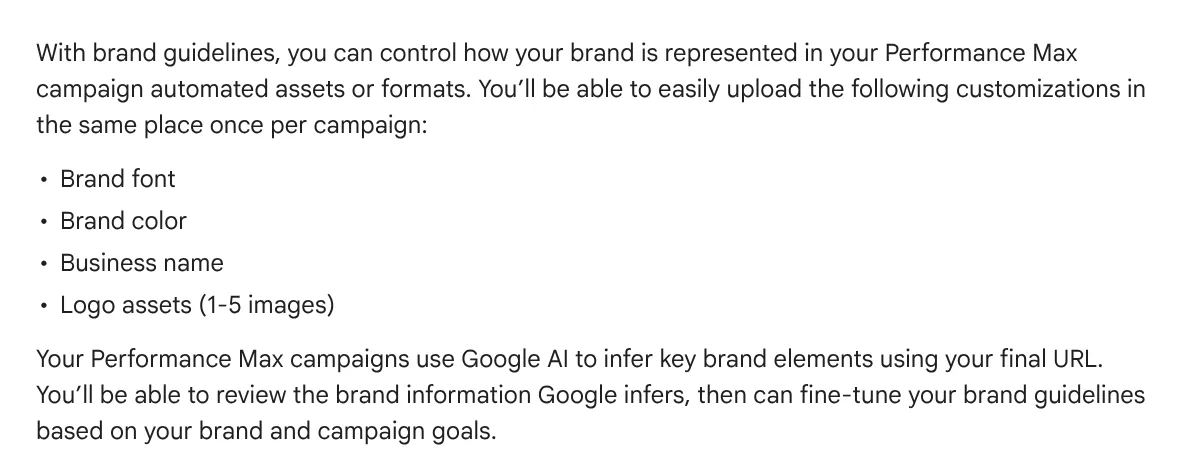
Platforms also store part of your brand guidelines. Meta Branding saves font, logo, up to 3 colors, visual style (background image style) and text tone, and currently applies only to single image ads (Meta Business Help Center). Google Ads has brand guidelines for Performance Max: business name, 1 to 5 logos, primary and secondary colors, and font, applied to autogenerated YouTube videos and responsive display ads. If you often build banners with AI in Google Ads, fill this in first (see the image below). Google states that not every creative type supports rendering with your brand guidelines (Google Ads Help).
The concept x hook x format matrix
These three terms get mixed up, so here they are as a restaurant:
- Concept is the dish: what you sell the customer, which worry it resolves.
- Hook is the greeting at the door: the first 1 to 3 seconds that make someone stop, measured by hook rate.
- Format is the plating: 9:16 vertical video, 4:5 still image, carousel, a clip cut from a livestream selling session.
Changing the hook changes the greeting; changing the concept changes the dish. Following Meta’s recommendation above, two ads that differ only in hook are still close to each other.
Example (hypothetical): 30 ads for a roasted coffee brand
Say I am preparing ads for a 250g bag of unblended roast coffee priced at 150,000 VND, sold on a website and TikTok Shop. All figures are hypothetical.
Step 1: find customer worries. Reading 1 and 2 star reviews of other coffee shops, I collect 5 worries: (1) bitter or sour taste; (2) the phin filter takes effort; (3) is it really unblended; (4) pricier than supermarket coffee; (5) loses aroma over time.
Step 2: turn each worry into a concept. Concept A answers (2) with a 3-minute brewing demo. Concept B answers (3) with close-ups of unblended beans. Concept C answers (4) with the cost per cup: one bag makes about 12 cups, or 12,500 VND a cup. Concept D answers (1) with UGC (content made by real customers) about the taste. Concept E answers (5) with the one-way valve on the bag.
Step 3: 3 hooks per concept. The hook is the first line of the ad script, so I write three types: a question (“Does a phin filter really take 10 minutes?”), a result (“A 12,500 VND cup of coffee made at home”), and a pattern break (“Don’t buy coffee if you can’t spare 3 minutes in the morning”).
Step 4: 2 formats per hook. A 15-second vertical video and a 4:5 still image. 5 x 3 x 2 = 30.
Step 5: spell out what AI does for each concept. This is the step most often skipped:
| Concept | Worry | Real footage or photo | AI does | AI must not |
|---|---|---|---|---|
| A. 3-minute brew | (2) | Phin brewing, a timer | Cuts, subtitles, music | Fake the brewing scene |
| B. Bean close-up | (3) | Macro photo of real beans | Change scene and lighting | Draw coffee beans |
| C. Cost per cup | (4) | Photo of bag and cup | Backgrounds, layout variants | Write the numbers on the image |
| D. Customers on taste | (1) | Real customer video, KOC (real users who review products) | Subtitles, 15-second cut | Create fake customers |
| E. Aroma valve | (5) | Close-up of the valve | Kitchen scene, lighting | Redraw the packaging |
AI carries most of the work for B, C and E (still images, new scenes) and only does post-production for A and D, the two concepts that need video production with real people and real scenes. Concept D never uses AI people posing as customers: that is a fake review.
Step 6: launch schedule. A small budget split across 30 ads at once leaves most of them with almost no delivery. I split by week: week 1 launches 10 ads (5 concepts x 2 formats, question hook), week 2 swaps in the result hook, week 3 the pattern-break hook, week 4 moves budget to the best 1 or 2 concepts and drafts next month’s matrix.
What AI ad creative tools inside ad platforms can do
Meta has Advantage+ creative (its set of features that enhance creatives and generate variations), TikTok has Symphony, Google has Asset studio. I list only features documented officially, along with language limits. Tools outside the platforms (AI image generators, AI video generators, voiceover) are covered in the post on generative AI in marketing.
| Platform | Feature | What it does | Limits to know |
|---|---|---|---|
| Meta | Image generation | Creates image variations from your original image or video | Not yet available for Advantage+ app, Advantage+ sales or Advantage+ catalog campaigns |
| Meta | Text generation | Up to 5 variations of primary text and headline | Source text in English, Portuguese, Spanish |
| Meta | Video generation | Turns several product images into a multi-clip video with text and music | Only some languages (English, French, German, Italian, Korean, Japanese, Chinese) and select verticals |
| TikTok | Symphony Creative Studio | Generates video from text or existing assets, avatar videos, translation and dubbing | Output is automatically labeled “AI-generated”; the November 2026 update is available in countries with TikTok Ads Manager and BytePlus, excluding the US |
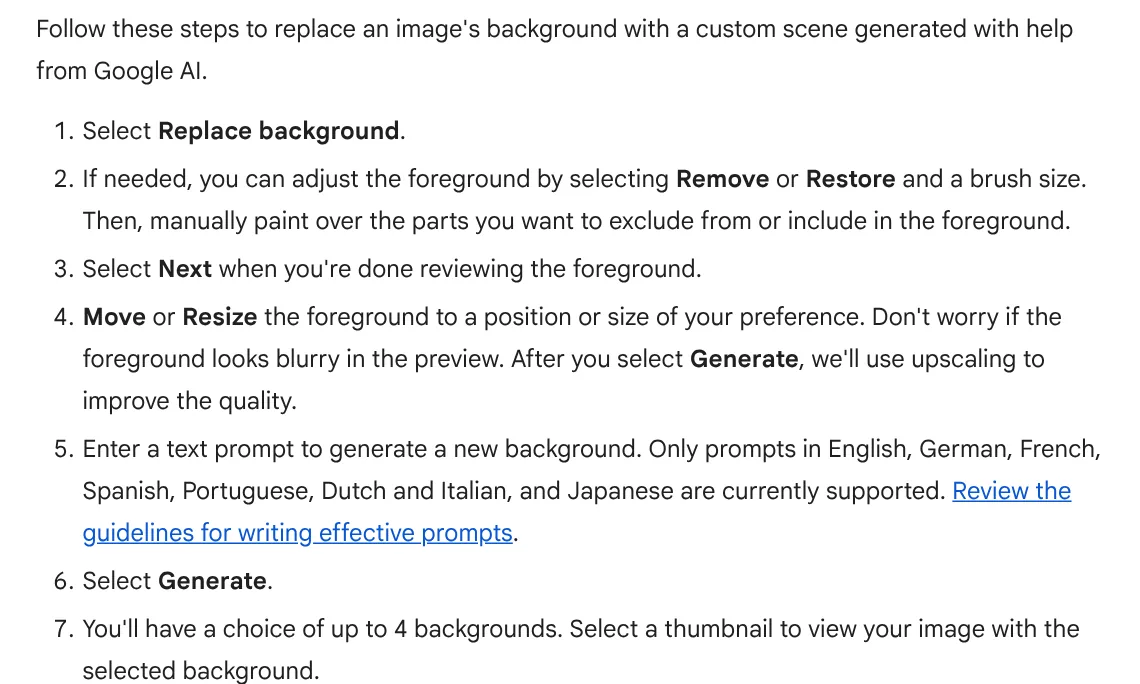
| Asset studio, image editor | Generates images from a prompt, replaces backgrounds, crops to 3 ratios (landscape, portrait, square) | Background prompts do not accept Vietnamese yet |
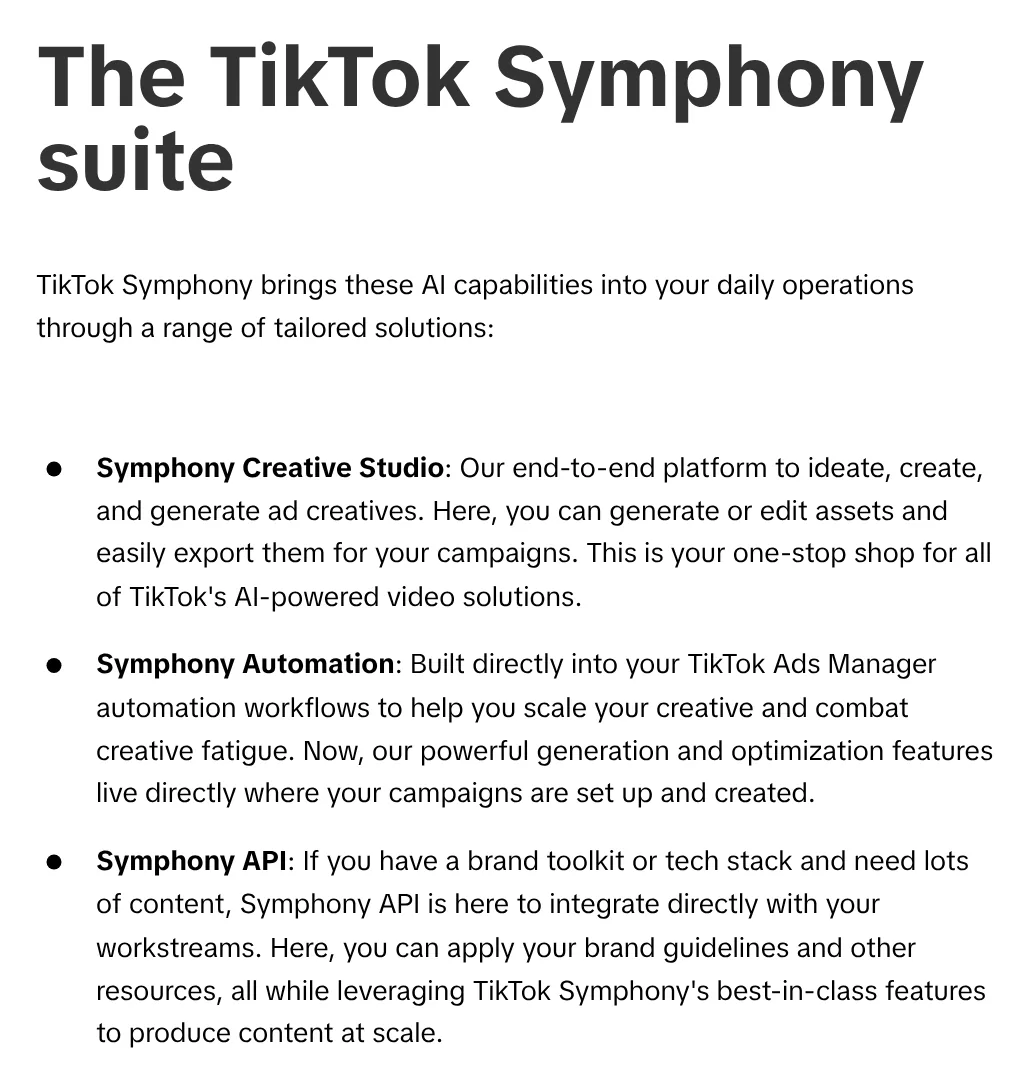
If you want to make AI video ads inside a platform, look at Symphony. TikTok splits it into three parts: Creative Studio to create and edit video, Automation inside Ads Manager to scale creative and fight creative fatigue, and an API that applies brand guidelines when you produce at volume (see the image below). The November 2026 update allows videos up to 30 seconds long, up from 15.
On Google, the Asset studio image editor accepts background prompts only in English, German, French, Spanish, Portuguese, Dutch, Italian and Japanese (see line 5 in the image). Write the prompt template in English once, store it in your brand guidelines and let the whole team reuse it.
Content review before launch
AI ads are fast to make, so mistakes arrive fast too. I review every ad in four layers.
12-point checklist
Layer 1: brand
- Colors, font and logo match the brand guidelines; the logo was not redrawn by AI.
- Copy matches the brand voice page, with no blocked words.
- Placed next to 3 past winners, it still looks like the same brand.
Layer 2: product and information
- The product in the image matches the real item: shape, label, color, volume.
- Price, promotion and end date match the landing page.
- Vietnamese text on the image has correct diacritics and spelling.
- Claims cover only what the product does, with no promises the AI made up.
Layer 3: rights and legal
- No real person’s face or voice without written consent.
- No logos, characters or music belonging to others.
- Regulated categories (cosmetics, supplements, finance) have been cleared by legal.
Layer 4: AI label
- You have recorded where AI was used in the ad (background, person, voice, text).
- You have decided whether to label it and where (process below).
Fail any item in layers 2 to 4 and the ad is remade, not “tested to see what happens”.
AI labeling process for ad creatives
Article 18 of Vietnam’s Decree 142/2026/ND-CP (in force since May 1, 2026), which implements the Law on Artificial Intelligence, requires a clearly recognizable label when AI-generated or AI-edited audio, images or video imitate a real person’s appearance or voice, or recreate real events (Official Gazette No. 278, May 18, 2026). The 12 ad scenarios and how to switch on labels per platform are in the post on AI content labeling. Here I plug that work into the 30-ad process.
Step 1: add a “Where AI was used” column to your creative tracker. Enter one of these values: color and brightness only; AI background; AI person; AI voice; AI-written text.
Step 2: classify under Article 18. Quality edits that do not change the nature of the content, spelling fixes and translation are exempt from labeling (Clause 4). A person or voice resembling a real person needs a clearly recognizable label (Clause 2). AI content that could mislead viewers about events, people or origin requires a clear notice (Clause 1). For unclear cases, such as an AI model who resembles no one in particular, ask legal and record the answer.
Step 3: choose where the label goes. Clause 5 lets you choose: on the content, in the title or description, in the platform interface, or by audio. For short video, I put a text line on the video and repeat it in the caption.
Step 4: the maker informs the publisher. Under Clause 6, whoever creates or edits content with AI during production must give the necessary information to whoever publishes it. In practice, the designer, agency or KOC sends the file with a note on where AI was used.
Step 5: check the labels platforms add themselves. Videos made in Symphony Creative Studio carry an “AI-generated” label automatically (TikTok for Business, November 8, 2026). Ad images created or significantly edited with Meta’s generative AI tools may show AI info in the three-dot menu or an AI info label next to the ad label (Meta Business Help Center). A label hidden behind a three-dot menu is hard to call clearly recognizable, so I still put a label on the creative.
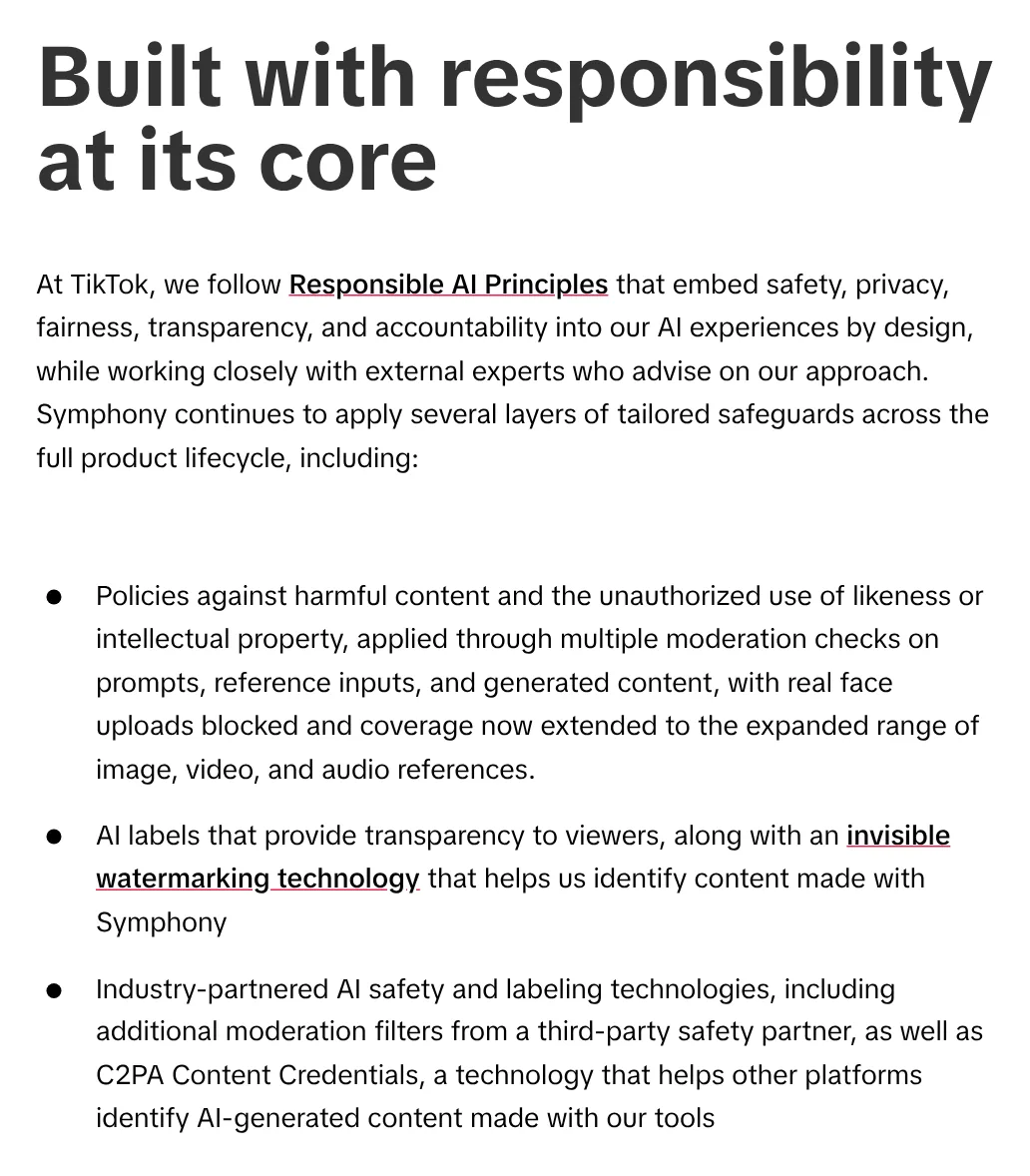
TikTok also blocks real face uploads to Symphony and uses invisible watermarking and C2PA Content Credentials so other platforms can identify content made with its tools (see the image below). The on-video label is not the only signal platforms use to detect AI content.
Measuring creative fatigue and replacing ads
Creative fatigue happens when the same people see an ad too many times and start scrolling past it. Like a jingle: fun the first time, a reason to change the channel by the twentieth.
Meta looks at all recent exposures of that image or video, including from other campaigns on the same Page, and compares cost per result with ads you ran in the past. Higher but less than double shows “Creative limited” in the Delivery column; double or more shows “Creative fatigue” (Meta Business Help Center).
Example (hypothetical): your past ads averaged 80,000 VND per result. A new ad at 120,000 VND gets Creative limited. At 160,000 VND or more, it gets Creative fatigue.
The status only appears for ad sets with one creative, and not for dynamic creative, Advantage+ catalog ads or Advantage+ app campaigns. For ad sets with several ads, track it yourself in a weekly sheet:
| Column | What to record | When to act |
|---|---|---|
| Matrix cell | For example A-question-video | Not applicable |
| Cost per result | First 7 days and this week | This week is double the first 7 days, borrowing Meta’s threshold |
| Frequency | Average times one person saw the ad | Rising steadily while CTR falls |
| Where AI was used, label | From the labeling process | Blank means it cannot run yet |
When an ad trips the alarm, replace it with the next cell in the matrix, preferring a different concept. Meta also advises creating a new ad with materially different imagery and keeping the original running instead of pausing it right away. When it is time to swap, the 30-cell matrix gives you ads that are already approved and labeled.
What to avoid when producing creative with AI
- Generating 30 ads first and thinking about concepts afterward. You end up with 30 variations of one idea.
- Switching on every Advantage+ creative enhancement without previewing the Vietnamese version.
- Launching all 30 ads in week one on a budget of a few million VND a day.
- Leaving the “Where AI was used” column blank because you assume the platform will label it.
If you need help building a creative strategy, brand guidelines for AI and a test matrix for your Meta and TikTok accounts, the Adtek team can work alongside you from the first month.
Want to apply this to your business?
Send your question or situation. The Adtek team reads every question and gets back to you.
Prefer to chat? Message us on Zalo Categories
 Recent Posts